#Test: JPlay, the ultimate hi-fi app for iOS

Updated: Jun 5


JPLAY iOS: Control Your Music with Simplicity and High Quality
When it comes to high-fidelity digital audio, the pursuit of uncompromising musical listening frequently leads to exploring network music management and control solutions.
Among these, I recently discovered — thanks to a gathering with audiophile friends — JPLAY iOS.
This app has emerged as one of the most remarkable applications available today, offering a fluid, elegant experience that is, above all, designed for optimal audio quality.
Which is what we're after, isn't it? Follow me:

What is JPLAY on iPhone and iPad?
The author and developer of JPlay, Marcin Ostapowicz, started in 2010 by designing a high-end audio playback software called JPlay FEMTO for Windows which, despite its understated interface, is today recognized throughout the audiophile world for its quality.

Today, its creator has chosen to maintain that same philosophy by offering an iOS application called JPLAY. It is designed for audiophiles who want to control their streamers and USB/network DACs very simply, using the UPnP/DLNA protocol.
The core idea behind JPLAY is to centralize access to your various music sources within a single interface — whether that means files stored locally on a NAS server, on the hard drive of a streamer unit, or from online streaming services like Qobuz and Tidal.

Behind its elegant and fluid interface, JPlay conceals a technically formidable, highly optimized architecture. The goal is simple: deliver music without alteration, without forced upsampling or parasitic equalization. All wrapped in a crystal-clear, almost addictive ergonomics.
Its greatest strength lies in playback precision, timing accuracy, and the suppression of interference and parasitic noise generated by computing processes.

Key highlights:
Bit-perfect playback with a network-optimized architecture
Smooth playback from Qobuz, TIDAL, and local UPnP servers
A beautiful and intuitive interface for effortless music exploration
Native HQPlayer support
Its philosophy: "Whether you are playing your own local audio content or streaming from sources like Qobuz or Tidal, JPLAY guarantees the most natural and vivid musical experience possible."

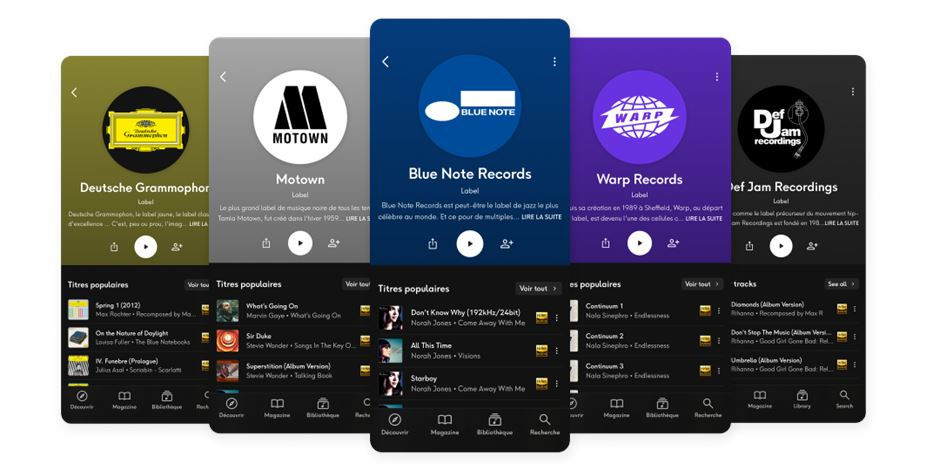
I found its modern, clean interface makes it easy to search catalogues, create playlists, and browse albums with full metadata display: artist biographies, album reviews, and even digital booklets where available — on Qobuz, for example.

With just a few gestures, you can view file resolution, access recommendations, or discover new music through an intelligent suggestion feature.

A technically essential characteristic of JPLAY is that it does not process the audio stream on the iPhone or across the network in a resource-hungry way. On the contrary, it drastically minimizes network traffic between your phone and the streamer, thereby reducing noise and interference that can impair sound reproduction.
All signal management is delegated to the streamer/DAC, guaranteeing maximum signal integrity.
A truly autonomous mode of operation
JPlay can operate in a fully standalone manner.
The iPhone or iPad becomes a source in its own right, connected to a USB DAC (tested with the Chord Mojo 2 and iFi Audio Gryphon), a UPnP/DLNA-compatible streamer (e.g., Eversolo DMP-A6), or a network renderer such as Roon Ready or HQPlayer.
Here, there is no strict need for a computer to be switched on — though for local music, you will need to run server software on a PC or Mac; MinimServer is a recommended solution.
The application communicates directly with the network, negotiates bit-perfect streams, and ensures flawless playback continuity even over long listening sessions.

Qobuz, TIDAL, and local music: all integrated
One of JPlay's great strengths is its ability to aggregate your sources without getting you lost in labyrinthine menus.
Qobuz and TIDAL are natively integrated: log in with your account and you'll find your favourites, playlists, purchases, and recommendations — exactly as on the official apps — except that playback is designed for pure Hi-Fi.
But where many other iOS players stop, JPlay keeps going: UPnP and DLNA server support is smooth and stable. Your NAS, or the storage attached to a streamer, is immediately detected. Once indexed, you can browse your local library like a classic media library — no delays, no endless refreshing.

HQPlayer: the geek and audiophile bonus
For the most demanding users, or those already running HQPlayer in their system, JPlay makes an interesting partner.
Native support allows you to take advantage of HQPlayer's conversion and upsampling engine while benefiting from JPlay's mobile ergonomics.
You can control playback from your iPhone or iPad, route streams to a compatible DAC, and let HQPlayer handle PCM/DSD conversion, filters, and modulators.
For geeks, DSD512 enthusiasts, or owners of very high-end DACs, this is an ideal bridge between ease of use and ultimate optimization.
(I will be covering HQPlayer soon in an upcoming review.)

An interface that makes you want to keep listening
JPlay's aesthetic is understated but accomplished: album artwork displayed to its best advantage and smooth navigation between artists, albums, and playlists.
You browse your record collection without lag, check album or track information with a fingertip, and add to the queue with ease.
The listening sessions?
I ran three very different listening tests.
"Timeline" by the Pat Metheny Trio in Hi-Res 24/96 on Qobuz: a wide soundstage, surgical instrument placement, and that digital silence that only truly bit-perfect apps know how to preserve.
"Chevrolet" by Robert Plant (24-bit via Qobuz), a dense and organic track; the texture of the guitars, the roundness of the bass and the airiness of the vocals all come through without the slightest latency or dynamic compression.

"The Girl Is Mine" by Michael Jackson, DSD 64 1-bit @ 2.8 MHz stored on a hard drive connected to a UPnP network player. The reproduction is remarkably clear and fluid, with a natural quality to the voices of McCartney and Michael — precise and palpable dynamics reproduced perfectly by the system.

Who is it for?
Qobuz and TIDAL subscribers who want bit-perfect playback
Those who store their library on a NAS, UPnP server, or local streamer
Demanding USB DAC or network player users
Enthusiasts who already use or are considering an HQPlayer chain
Those who want an app that is beautiful, stable, responsive, and free of unnecessary frills
Compatible hardware:
iPhone / iPad running iOS 13 minimum, or Mac with ARM M1 processor
A compatible network audio player (UPnP, network-input DAC, or HQPlayer)
Wi-Fi or wired RJ45 network — all devices must be on the same Wi-Fi network
To access local music:
To browse and play music from your local library, you need an active UPnP media server on the network. The developer recommends MinimServer for its performance.

En résumé
In summary
Between bit-perfect playback, clean Qobuz/TIDAL management, local UPnP support, HQPlayer integration, and a polished interface, we have a mobile audiophile player that outperforms many far heavier PC/Mac solutions.
To that end, JPLAY requires either a subscription or a purchase, with a free trial period — but this investment is frequently considered well justified given its sonic qualities and ease of use when it comes to getting the most from high-end Hi-Fi hardware.
JPLAY commits to purity and does not modify the audio stream, leaving the streamer to handle the signal as directly and cleanly as possible. This approach frequently delivers a sense of space, transparency, and neutrality that is hard to match.
As a result, JPLAY sounds more "natural" — even more "alive."
If what you are looking for above all is simplicity, fast access to your music, and the purest possible sound built around a compatible streamer, JPLAY iOS is a remarkable solution worth serious consideration.
More information at: https://jplay.app
JPlay is available for download on iOS here.
The links in this article are affiliate links. If you choose to subscribe, place an order, or purchase an album through them, the blog receives a small commission. This has absolutely no impact on the price you pay, but it directly helps fund equipment tests and keep GuideAudioPassion running independently.
Thank you for your support!